Hire WooCommerce Developer: Where to Find the Best Talent
Your WooCommerce store is losing sales because of slow load times, broken plugins, or a checkout flow that feels stuck in 2015. You've searched "hire WooCommerce developer" a dozen times, scrolled through freelance marketplaces, and still aren't sure where to find someone who actually knows WooCommerce beyond installing a theme. That uncertainty costs you time and revenue every day the fix gets delayed.
This article gives you a straight answer: the actual platforms, agencies, and hiring routes where qualified WooCommerce developers show up, along with what separates a skilled developer from someone who'll break your site during a plugin update. You'll see the tradeoffs between freelance marketplaces, agencies, and dedicated offshore hires, plus realistic cost ranges for each.
We'll walk through where experienced teams source vetted WooCommerce talent, what questions to ask before you commit, and how to avoid the common mistake of hiring based on price alone. By the end, you'll know exactly where to look and how to evaluate candidates so your store gets built or fixed right the first time, without wasting weeks on the wrong hire.
1. GlobalEmployees for dedicated offshore WooCommerce developers
If you need a full-time WooCommerce developer without the overhead of running a hiring process yourself, GlobalEmployees is built for exactly that gap. The company recruits, vets, and employs full-time developers in India, then places them as dedicated offshore hires who work solely for your store, not split across five other client projects like most agency retainers. This matters for WooCommerce specifically, because plugin conflicts, checkout customizations, and performance tuning usually take ongoing attention rather than a one-off fix.
How it works
You start by sharing your requirements, whether that's a developer who knows WooCommerce hooks and filters, someone comfortable with custom payment gateway integrations, or a person who can manage a multi-vendor marketplace build. GlobalEmployees pulls from a pool of 2,800+ vetted candidates and sends you resumes and interview access at no cost. You interview and assess candidates directly, pick who you want, and the developer starts work as a full-time member of your operation, using equipment and infrastructure GlobalEmployees provides.
The real advantage here is control: you manage the work day to day, while GlobalEmployees handles payroll, compliance, and HR in the background.
Who it is best for
This route suits store owners needing ongoing support rather than a single project. If you run a WooCommerce store generating steady revenue and need someone who understands your catalog, your customizations, and your customers' behavior over months or years, a dedicated hire beats hopping between freelancers every few weeks. It also fits businesses that want to build a small team eventually, since you can add a designer or marketer under the same arrangement without starting a new vendor relationship each time.
Typical costs
Dedicated WooCommerce developers through GlobalEmployees start at $1,090 per month for a full-time hire, which typically works out cheaper than a single mid-level freelance project in the US or UK. There's no setup fee, no recruitment cost, and no infrastructure expense, since laptops and software licenses come included. Compare that to paying a US-based freelance WooCommerce developer $75 to $150 an hour, where a modest redesign or plugin overhaul can run $5,000 to $15,000 for the same month of work you'd get from a dedicated hire at a fraction of the price.
Pros and cons
Before committing, weigh what you gain against what you give up compared to a project-based freelancer or agency:
- Pro: Zero setup, HR, or infrastructure costs, since GlobalEmployees covers recruitment and equipment.
- Pro: Full-time attention from one developer instead of shared bandwidth across multiple clients.
- Pro: No long-term contract lock-in, so you can scale the team up or down with short notice.
- Pro: A 100% money-back guarantee or fast replacement if the developer isn't a fit.
- Con: Working with remote developers in India brings time zone differences, so you'll need to plan overlap hours or rely on async communication.
- Con: This model works best for ongoing needs, not a quick one-week fix, since you're hiring a full-time dedicated developer rather than a short-term contractor.
Given the cost gap and the removal of hiring risk through free resume access before you commit to anything, this option makes sense as the first stop for anyone planning to keep a WooCommerce developer on staff long-term rather than project-hopping through freelance platforms.
2. Woo Agency Partners directory
WooCommerce itself maintains an official directory of agencies and freelancers who've been vetted for platform expertise, and it's worth checking before you go hunting on general freelance sites. This directory groups certified WooExperts and agency partners who've built a track record with the platform's core team, which gives you a shortcut past developers who list WooCommerce as a skill but have only touched it once or twice.
How it works
You browse the directory by category, whether that's store setup, custom development, or ongoing maintenance, and filter by location or specialization. Each listing shows the agency's portfolio, client reviews, and areas of focus, so you can shortlist a few before reaching out directly. There's no built-in escrow or project management layer here; once you find an agency, you negotiate scope, timeline, and payment terms independently, the same way you would with any outside vendor.
A directory only tells you who's qualified on paper, not who's a good fit for your specific store and budget.
Who it is best for
This route suits business owners comparing agencies who want a starting list of pre-screened options rather than sorting through hundreds of freelance profiles. It works well if you're planning a bigger project, like a full store rebuild or a migration to WooCommerce from Shopify or Magento, and want an agency with documented platform history behind the pitch.
Typical costs
Agencies listed here tend to price on the higher end, often $100 to $200 an hour or flat project rates starting around $5,000 for mid-complexity builds. Because these are established agencies with overhead, you're paying for process and reliability more than speed or low cost.
Pros and cons
- Pro: Listings carry a level of platform credibility you won't find on general freelance sites.
- Pro: Good for larger, more complex projects needing an established team.
- Con: No centralized vetting of pricing or communication style, so quality still varies agency to agency.
- Con: Higher rates make this a poor fit for smaller fixes or ongoing part-time support.
3. Codeable for vetted freelance experts
Codeable screens every developer before letting them onto the platform, rejecting roughly 98% of applicants based on published numbers. That filtering matters if you've been burned before by a freelance hire who claimed WordPress experience but couldn't debug a plugin conflict. When you hire WooCommerce developer talent through Codeable, you're picking from a pool that's already been tested on code quality, communication, and platform-specific knowledge before you ever see a profile.
How it works
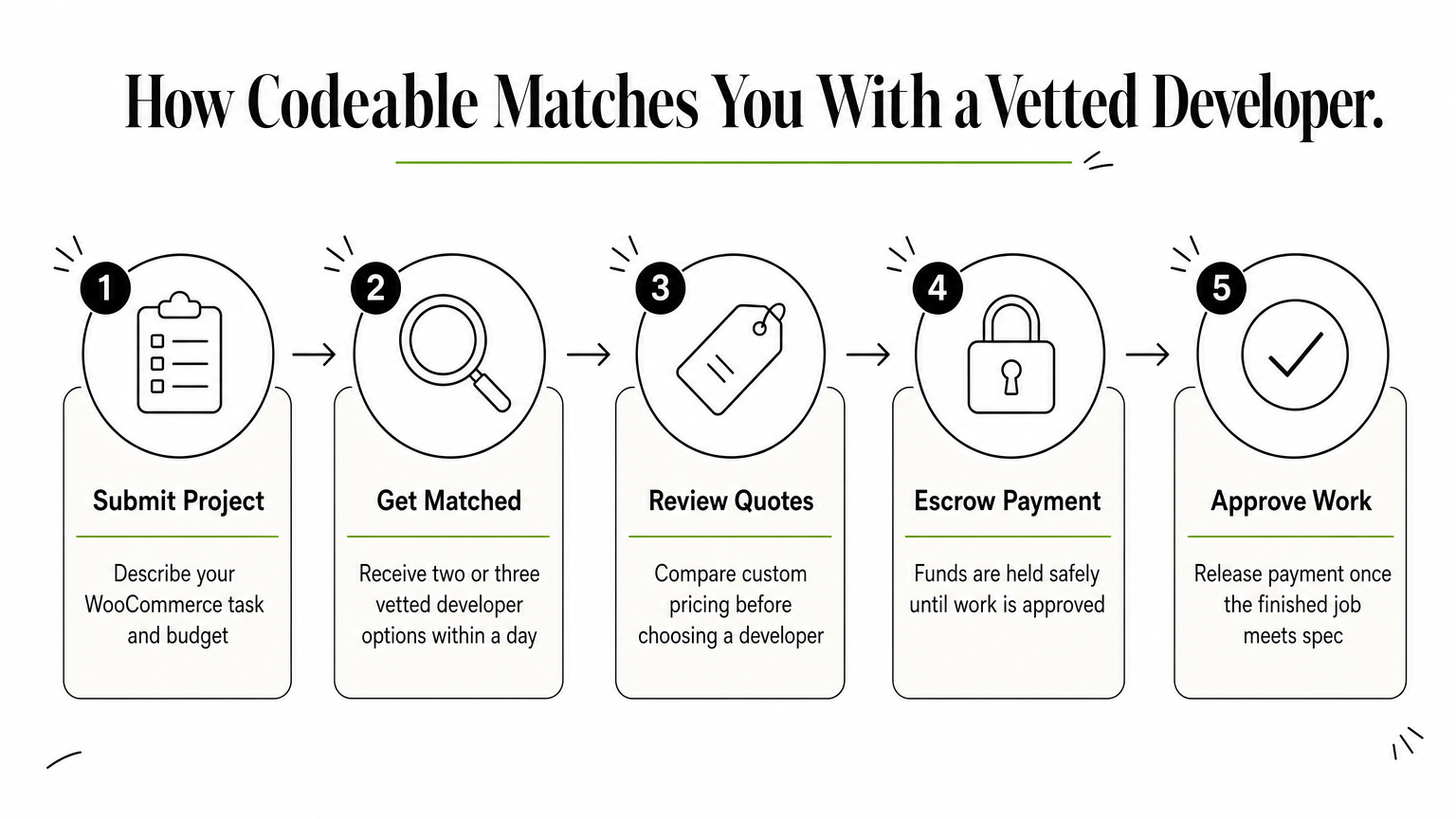
You submit a project description through Codeable's request form, and the platform matches you with two or three developers whose skills fit the job, usually within a day. Each match includes a custom quote based on your scope, and you can message the developer directly to clarify details before agreeing to anything. Codeable holds payment in escrow until you approve the finished work, which removes the risk of paying upfront for a job that goes sideways.
Vetting upfront saves you the interview grind, but it doesn't remove the need to check portfolio work yourself.
Who it is best for
This route fits business owners with a defined project who want expert-level work without running their own screening process. It works well for scoped tasks like a checkout customization, a speed optimization pass, or fixing a broken payment gateway integration, rather than open-ended, long-term staffing. If you know what you need built and want a specialist who's done it before, Codeable removes most of the guesswork.
Typical costs
Codeable developers charge $70 to $120 an hour on average, with most projects quoted as a fixed price after the initial scoping conversation. A mid-sized customization might run $1,500 to $4,000, while a full store build can climb past $10,000 depending on complexity.
Pros and cons
- Pro: Rigorous vetting means fewer wasted interviews compared to open freelance marketplaces.
- Pro: Escrow-based payment protects you if the work doesn't meet spec.
- Con: Rates run higher than general freelance platforms, which adds up for ongoing or open-ended work.
- Con: No option for full-time, dedicated staffing if your needs extend beyond a single project.
4. Toptal for enterprise-level talent
Toptal markets itself as the top 3% of freelance talent, and the screening process backs that claim up with a multi-stage vetting pipeline that includes live coding tests, personality assessments, and in-depth technical interviews. When you need to hire WooCommerce developer talent for a mission-critical project, like a store migration handling six figures in monthly revenue, Toptal's reputation for enterprise-grade work makes it a reasonable place to start, provided your budget can absorb the premium pricing that comes with it.
How it works
Applying starts with a call to a Toptal representative who scopes your project and matches you with a developer, usually within 48 hours. You get a trial period, typically two weeks, to confirm the developer fits before committing further, and Toptal replaces the match at no cost if it doesn't work out. Communication runs through Toptal's own project tools, and you manage day-to-day work directly with the developer once the match is confirmed.
Paying a premium buys you speed and reliability, not necessarily deeper WooCommerce-specific expertise than a specialized freelancer would bring.
Who it is best for
This platform suits funded companies with complex builds where a failed hire costs more than the higher hourly rate. Think custom WooCommerce integrations with ERP systems, high-traffic stores needing serious performance engineering, or teams that need a developer who can also architect broader e-commerce infrastructure beyond WooCommerce itself. Smaller stores with straightforward customization needs will find the pricing hard to justify.
Typical costs
Toptal developers typically charge $60 to $200+ an hour, with WooCommerce specialists often landing in the $100 to $150 range. There's no fixed-price option for most engagements, and Toptal doesn't publish a platform fee, since it's built into the developer's quoted rate.
Pros and cons
- Pro: Rigorous vetting process filters out underqualified applicants before you ever see a profile.
- Pro: Risk-free trial period lets you confirm fit before paying for extended work.
- Con: Pricing sits well above Codeable and general freelance marketplaces, pricing out smaller projects.
- Con: Toptal's vetting focuses on general development skill rather than deep, verified WooCommerce specialization.
5. Upwork for flexible freelance hiring
Upwork remains the largest general freelance marketplace, and that scale cuts both ways for WooCommerce hiring. You'll find thousands of developers listing WooCommerce as a skill, from agency teams to solo contractors charging $15 an hour, but the platform doesn't pre-screen anyone the way Codeable or Toptal does. If you want to hire WooCommerce developer talent here, the burden of vetting falls entirely on you.
How it works
You post a job listing describing your scope, budget, and timeline, then wait for proposals to roll in, usually within hours. Freelancers bid with a proposed rate and a short pitch, and you review profiles, past work history, and client feedback scores before shortlisting anyone. Upwork offers both hourly contracts with built-in time tracking and fixed-price contracts with milestone payments, so you can choose whichever structure fits the job. Payment goes through Upwork's escrow system for fixed-price work, which protects you if a milestone isn't delivered as agreed.
More options means more noise, and finding a genuinely skilled WooCommerce developer on Upwork takes real screening effort on your end.
Who it is best for
This route suits buyers comfortable vetting candidates themselves who want maximum flexibility on budget and scope. It works for one-off tasks, like fixing a broken plugin or tweaking a theme, as well as longer engagements if you're willing to interview several candidates before committing. Businesses without much hiring experience often struggle here, since separating a strong developer from an inflated profile takes practice.
Typical costs
Rates span an unusually wide range, from $15 an hour for developers based in lower-cost regions to $100+ an hour for specialists with strong portfolios, a spread that mirrors the wider gap between developer costs in India and the US. A simple fix might cost $50 to $200, while a full store build can run $2,000 to $8,000 depending on who you hire and how tightly you scope the project.
Pros and cons
- Pro: Huge pool of developers across every price point and skill level.
- Pro: Escrow protection on fixed-price contracts reduces payment risk.
- Con: No platform-level vetting, so screening quality candidates takes significant time.
- Con: Inconsistent communication and reliability compared to agencies or vetted marketplaces, since anyone can create a profile.
6. Fiverr Pro for quick, fixed-price tasks
Fiverr Pro sits apart from the regular Fiverr marketplace, where anyone can list a gig regardless of skill. Fiverr Pro requires an application and manual review before a seller gets the badge, which cuts down on the race-to-the-bottom pricing that makes standard Fiverr risky for anything beyond trivial fixes. If you need to hire WooCommerce developer help for a narrowly defined task, like fixing a broken checkout or installing and configuring a plugin, Fiverr Pro gives you a faster, cheaper option than the marketplaces built for open-ended engagements.

How it works
You search Fiverr Pro's WooCommerce category and browse gig listings, each priced as packages, usually Basic, Standard, and Premium, with a fixed scope and delivery time attached to each tier. There's no bidding process here; you pick a package, submit your requirements through a structured order form, and the seller delivers within the stated timeframe, often 3 to 7 days. Fiverr holds your payment until you approve the delivery, and most sellers offer a set number of revisions built into the package price.
Fixed-price gigs work well when your task has clear edges, but they fall apart fast once your project needs back-and-forth scoping.
Who it is best for
This platform suits buyers with a narrow, well-defined task rather than an evolving project. It fits situations like migrating a handful of products, fixing a specific plugin conflict, or setting up a payment gateway, where you can describe the deliverable in a sentence or two. Store owners with vague requirements or projects likely to shift mid-build should look elsewhere, since Fiverr Pro's fixed packages don't flex well once work starts.
Typical costs
Pro-tier WooCommerce gigs typically run $150 to $600 per package, depending on complexity and delivery speed. Rush delivery and extra revisions cost more on top of the base package price, and custom quotes for larger jobs usually land between $800 and $2,500.
Pros and cons
- Pro: Fixed pricing removes the guesswork of hourly billing for small tasks.
- Pro: Faster turnaround than most freelance marketplaces, since sellers structure gigs around set delivery windows.
- Con: Poor fit for projects that need ongoing scope changes or discovery conversations.
- Con: Fewer sellers than standard Fiverr or Upwork, which limits your options for niche WooCommerce needs.
7. Specialized WooCommerce development agencies
Boutique agencies that work exclusively or primarily in WooCommerce sit in a different category than general web dev shops that happen to list it among ten other platforms. These teams built their business around WooCommerce specifically, so they've likely already solved the exact problem you're facing, whether that's a subscription billing setup, a multi-currency store, or a migration from Magento. If you want to hire WooCommerce developer expertise without managing individual freelancers yourself, a specialized agency gives you a full team behind a single point of contact.
How it works
You typically start with a discovery call where the agency reviews your store, asks about your goals, and scopes the project before quoting a price. Larger agencies assign a project manager who coordinates developers, designers, and QA testers on your behalf, so you're not managing individual contributors the way you would on a freelance platform. Most agencies work on retainer for ongoing support or fixed-scope contracts for one-time builds, and many require a minimum engagement, often a few thousand dollars or a multi-month commitment, which rules out this option for small, quick fixes.
An agency team gets you redundancy and process, but you pay for that structure whether or not you need the full team on your project.
Who it is best for
This route fits businesses running complex, high-stakes stores where downtime or bugs cost real revenue and a single freelancer's bandwidth isn't enough. It also suits companies that want ongoing strategic input, not just execution, since agencies often bring recommendations on conversion optimization or infrastructure beyond what you asked for. Smaller stores or one-off projects rarely justify the minimum spend agencies require.
Typical costs
Specialized WooCommerce agencies generally charge $100 to $250 an hour, with retainer packages starting around $3,000 to $5,000 a month for ongoing support. Full builds or major replatforming projects often run $15,000 to $50,000 depending on scope and integration complexity.
Pros and cons
- Pro: Full team coverage means no single point of failure if one developer is unavailable.
- Pro: Agencies bring process, documentation, and often broader e-commerce strategy beyond raw development.
- Con: Minimum engagement sizes and retainer requirements price out smaller projects.
- Con: Higher overhead costs get passed to you, even for straightforward work a solo freelancer could handle.
8. LinkedIn, job boards, and developer communities
Sourcing directly through LinkedIn, niche job boards, and developer communities skips the marketplace layer entirely, putting you in touch with candidates before any platform takes a cut. This route takes more legwork than posting a job on Upwork, but it opens up developers who don't list themselves on freelance sites at all, including people currently employed full-time who'd consider a side project or a full-time switch for the right offer. If you're trying to hire WooCommerce developer talent for a permanent, in-house role rather than a contract gig, this is often where the search actually starts.
How it works
You post a role on LinkedIn Jobs, WordPress-specific boards like WPJobBoard, or communities such as the Advanced WordPress Facebook group and WooCommerce's own developer Slack channels. Sourcing here means writing a clear job description, screening applicants yourself, and running your own technical interview, since none of these channels vet candidates for you. Expect a slower response cycle than a marketplace, often days rather than hours, because you're relying on organic visibility instead of an algorithm matching you to available freelancers.
Direct sourcing trades speed for reach, giving you access to candidates who never show up on freelance platforms at all.
Who it is best for
This approach suits companies hiring for a permanent role or building an internal team rather than outsourcing a single project. It also fits founders with technical chops who can run their own screening process and don't need a platform's vetting as a crutch. Businesses without the time or expertise to evaluate code samples and run interviews will burn more hours here than they save.
Typical costs
LinkedIn job postings run $200 to $500 for basic visibility, plus your own time cost for screening and interviewing. Niche WordPress job boards charge less, often $50 to $150 per listing, while community postings in Slack or Facebook groups are typically free but reach a smaller, more self-selected audience.
Pros and cons
- Pro: Access to passive candidates not actively browsing freelance marketplaces.
- Pro: Lower platform fees compared to marketplace commissions.
- Con: No built-in vetting, escrow, or dispute resolution if a hire goes wrong.
- Con: Slower, more labor-intensive process that demands real interviewing skill on your end.
Finding the right fit for your store
Eight routes, one decision: match the hire to the actual problem. A one-off fix points you toward Fiverr Pro or Codeable, a complex rebuild justifies an agency's higher rates, and a quick freelance test makes sense on Upwork before you commit further. But if your store needs consistent attention month after month, none of those project-based options solve the real issue: you'll keep re-explaining your setup to someone new every few months.
A dedicated developer who learns your store once and sticks around solves that problem directly, and at $1,090 a month with zero setup or HR cost, it's hard to beat on price or continuity. Skip the guesswork and browse vetted WooCommerce developer profiles before you commit to anyone. Hire a WooCommerce developer through GlobalEmployees and see real resumes first, free.